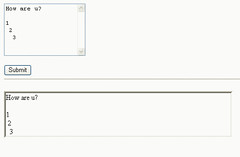
In the above example, the box @ the top is the textbox and at the bottom is a label which is enclosed in a panel (with border for illustration).
The aspx is as follows:
The code behind is as follows:
<%@ Page Language="VB" AutoEventWireup="false" CodeFile="RichText.aspx.vb" Inherits="RichText" %>

<!DOCTYPE html PUBLIC "-//W3C//DTD XHTML 1.0 Transitional//EN" "http://www.w3.org/TR/xhtml1/DTD/xhtml1-transitional.dtd">
<html xmlns="http://www.w3.org/1999/xhtml">
<head runat="server">
    <title>RichText Page testing</title>
</head>
<body>
    <form id="form1" runat="server">
    <asp:TextBox ID="txtInput" runat="server" Rows="7" TextMode="MultiLine"></asp:TextBox>
    <br />
    <br />
    <asp:Button ID="btnSubmit" runat="server" Text="Submit" />
    <br />
    <hr />
    <br />
    <asp:Panel ID="Panel1" runat="server" BorderStyle="Inset" Width="500px">
        <asp:Label ID="lblMsg" runat="server"></asp:Label>
    </asp:Panel>
    <br />
    </form>
</body>
</html>
Partial Class RichText
 Inherits System.Web.UI.Page

 Protected Sub btnSubmit_Click(ByVal sender As Object, ByVal e As System.EventArgs) Handles btnSubmit.Click
     Dim tmpStr As String
     tmpStr = Replace(txtInput.Text, vbNewLine, "
")

     lblMsg.Text = Replace(tmpStr, " ", " ")

 End Sub


End Class
As shown above, we just need to detect the newline and replace it with <br> which is a new line in html. The same goes for spaces.
Alternatives
However, if you need to include bold, underline etc. You can probably build your own control or purchase a commercial control. There also a GPL solution available that supports multiple platform - call FCKeditor. This appears more promising but requires some setup. There also other - just google "richtext html editor" and you will find a lot of other alternatives.
There is also an article I found that does some of this here.
No comments:
Post a Comment